
Do LinkedIn Invitations Expire?

Wondering if your LinkedIn connection requests expire? Yes, LinkedIn invitations expire. Whether you're a recruiter building a talent pipeline, a job seeker reaching out to hiring managers, or a sales professional expanding your network understanding how LinkedIn handles pending invitations can save you time and improve your outreach strategy.
How Long Do LinkedIn Invitations Last?
According to LinkedIn's official Help Center, all connection invitations expire 6 months after they're sent. This applies to:
- Invitations sent to existing LinkedIn members
- Invitations sent to people who haven't joined LinkedIn yet
Once an invitation expires, it's automatically removed from your pending invitations list. The recipient will no longer see it in their inbox, and LinkedIn stops sending reminder notifications about it.
The good news? You can immediately send a new invitation to the same person after the original one expires and no waiting period required.
What Happens Before Your Invitation Expires?
LinkedIn doesn't let your invitations disappear without notice. Before an invitation expires, LinkedIn sends two reminder emails to the recipient:
1. First reminder: Sent a few weeks after you send the invitation
2. Second reminder: Sent a few weeks before the invitation expires
These reminders encourage the recipient to accept, ignore, or decline your request. If they take no action after both reminders, the invitation simply expires at the 6-month mark.
Withdrawing vs. Letting Invitations Expire: What's the Difference?
You have two options for handling unanswered invitations: wait for them to expire naturally or withdraw them manually.
| Action | Can You Resend? | Waiting Period |
|---|---|---|
| Invitation expires naturally | Yes | None (resend immediately) |
| You withdraw manually | Yes | 3 weeks before resending |
Key takeaway: If you're certain someone won't accept, letting the invitation expire is actually better than withdrawing it. Withdrawing triggers a 3-week cooldown before you can reconnect with that person.
How to Check and Manage Your Pending Invitations
Want to see which invitations are still pending? Here's how:
Step 1. Click My Network in the top navigation

Step 2. Click Invitations -> Show all OR Click Manage
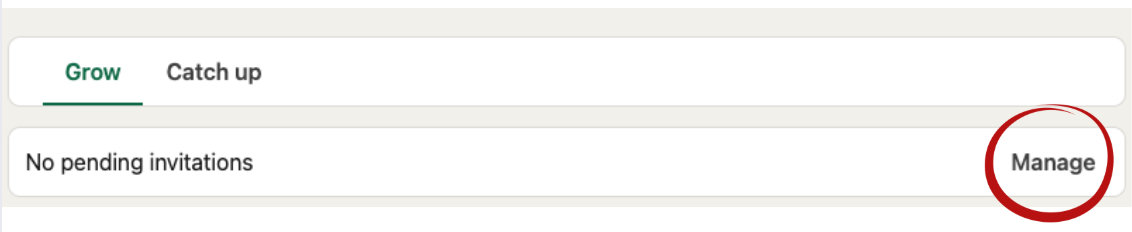
Step 3. Select the Sent tab to view pending invitations

From here, you can withdraw invitations if needed (just remember the 3-week cooldown applies).
Free vs. Premium: What's Actually Different?
There's a common misconception that LinkedIn Premium users can send more connection requests. Here's what LinkedIn officially confirms:
Connection invitation limits are the same for free and Premium accounts. LinkedIn uses behavior-based restrictions for all users, regardless of subscription level.
However, Premium does offer advantages for personalized invitations (invitations with a custom note):
| Feature | Free Account | Premium Account |
|---|---|---|
| Personalized invitations per month | 5 | Unlimited |
| Character limit for notes | 200 characters | 300 characters |
If personalization matters to your outreach strategy and it should Premium gives you more flexibility.
Why Understanding Expiration Matters for Your Role
For Recruiters
Expired invitations mean lost candidate connections. If you're building talent pipelines, check your pending list monthly. Consider resending expired invitations with refreshed, personalized messages that reference recent company updates or role changes.
For Job Seekers
Quality matters more than quantity. Rather than mass-sending connection requests to every recruiter you find, focus on personalizing your outreach. If an invitation to a hiring manager expires, that's your signal to try a different approach perhaps engaging with their content first before reconnecting.
For Sales Professionals
Pending invitations that sit for months aren't helping your pipeline. Review your sent invitations regularly and note which types of prospects respond versus ignore. Use this data to refine your targeting and messaging.
Frequently Asked Questions
1. Do expired invitations count against any limits?
No. Once an invitation expires, it's removed from your pending count entirely.
2. Will the recipient know if I withdraw my invitation?
No. LinkedIn doesn't notify users when someone withdraws a connection request.
3. What's the maximum number of connections allowed?
LinkedIn caps all accounts at 30,000 first-degree connections. This limit applies to both free and Premium users.
4. Can I resend an invitation to someone who ignored me?
Only after it expires. If your invitation is still pending (within the 6-month window), you cannot send another one to the same person.
5. Should I withdraw old pending invitations?
It depends. If maintaining a clean pending list matters to you, withdrawing is fine just remember you'll need to wait 3 weeks before resending to those people.